








-28%

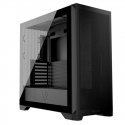
The product's shade and actual color may differ from what is shown in the picture, as the images are for illustrative purposes. The product description is general and may not include all the product's features.
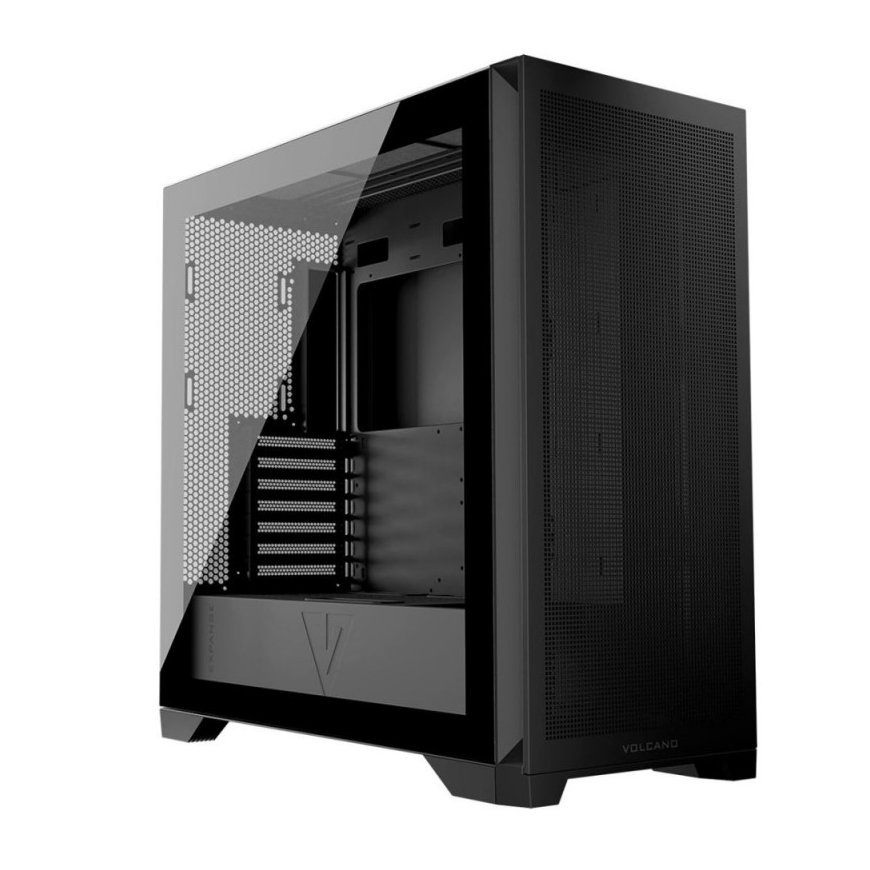
MODECOM Case VOLCANO EXPANSE S MIDI Black
109,00 €
79,00 €
Monthly payment from 2.93 €
3022127 AT-EXPANSE-SG-NF-10-000000-0002
5903560981800
Shipping 3-5 b.d.
You are interested in this product?
This is a gaming case... Volcano Expanse Midi computer case. Because what would a real gaming computer be without a case that allows all components to be mounted very conveniently and precisely? Moreover, without any frills found in new cases, you will find a classic in a modern version. There are many practical solutions for powerful gaming computers - easily removable front filter and one behind the power supply, instead of a cable management tray, a frame for three additional fans can be installed, plenty of space for gaming components, and great airflow. When looking for the best solutions, it is worth going back to the source. The interior design of the Volcano Expanse S MIDI case allows you to arrange the interior so that the computer truly becomes yours! There is a designated space at the height of the motherboard for mounting a cable tray or fan frame. Only you have to decide how to utilize the options for organizing the computer's interior. The case allows you to manage cables and keep the inside of the case tidy. This will be appreciated by people who primarily focus on aesthetics and need to maintain good computer order. And if you are building a real gaming beast and need the best possible cooling for components, instead of a case, you can install a frame for three additional 120 mm fans. The shape of the panels is such that the name of the case includes a letter derived from the word "square". It differs little from its double design, the Volcano Expanse T Midi. We give you the freedom to choose the panel design. It is very important that your computer is clean, so that there is no dust in the front, between the front panel and the case (the entire front) and to remove the filter for quick and easy cleaning. Cleaning the front panel is simple! No fans? That's fine! The main thing is that the components run cool. This way they operate more efficiently and their lifespan is extended. We provide the freedom to choose. You can install fans from a previous case or purchase ones that meet your visual expectations. You are given free hands and free choice to select the best solutions according to your needs. You can install three 140 mm fans at the front of the case and one 140 mm fan at the back. If you want even more configuration options, you can install three additional 120 mm or 2 x 140 mm fans on the top panel. Additionally, instead of a cable tray, by installing a special frame on the motherboard mounting wall, there is space for three 120 mm fans. In total, you can have up to 10 fans here! Without screws, it's easy and pleasant - everything with clips. The days of needing to unscrew panels are over. With the Volcano Expanse case, we offer pleasant and simple solutions so you can assemble your dream computer with a smile. All panels are mounted with clips - no tools are needed to remove the panel and comfortably install components. Need to add RAM sticks? Blow dust out from the inside? You can remove the panels with a smooth hand motion, without unscrewing them. At hand, the panel with USB/audio inputs is on the top of the case, so you can conveniently access the connections when the case is under the table. The panel has 2 USB 3.0 ports and one USB-C port. Classically, there is also a microphone and headphone input, as well as a power button and fan control. Water cooling The case is adapted for water cooling installation. There is space for a radiator up to 360 mm on the top of the case. A cooler of the same size will fit instead of the factory-installed fans at the front of the case. The same cooler (360 mm) can also be mounted on the dedicated motherboard wall frame, but its thickness cannot exceed 52 mm. At the back, there is space for 120/140 mm water cooling. The provided solutions are designed to create a true gaming machine for every game. And all this in a sturdy, spacious construction. Dust filter There is a dust filter behind the power supply. You can easily remove and install the filter, keeping your computer clean while increasing the efficiency and safety of the power supply and other installed components. It has been designed to make assembly and disassembly easier, facilitated by structural elements with magnets. Access to the filter is possible from both the front and back of the case. Dust filters are also installed on the top and side panels. Space for favorite games There will be plenty of space for favorite games. The case allows for the installation of two 2.5" drives on the motherboard tray. Additionally, you can install two 3.5" drives in the power tunnel. With so much space for drives, you can easily plan for new game installations and Velcro cable management. Their purpose is to protect cables from damage - especially the graphics card power cable. There are also Velcro cable holders at the back of the motherboard tray to keep the inside of the computer organized in the best possible way. The best cable management Good cable layout in the case is not only aesthetically important but also contributes to better airflow. A special metal construction element at the height of the motherboard mounting wall allows for convenient cable routing and optimal layout. In this case, aesthetics and top-quality cable organization are its second name. Ventilation Square-shaped ventilation openings on the top, front, and side panels are responsible for good airflow. To limit dust entry inside, there is a dust filter on the front panel. Since the panels are mounted with clips, cleaning the filters is very simple.