






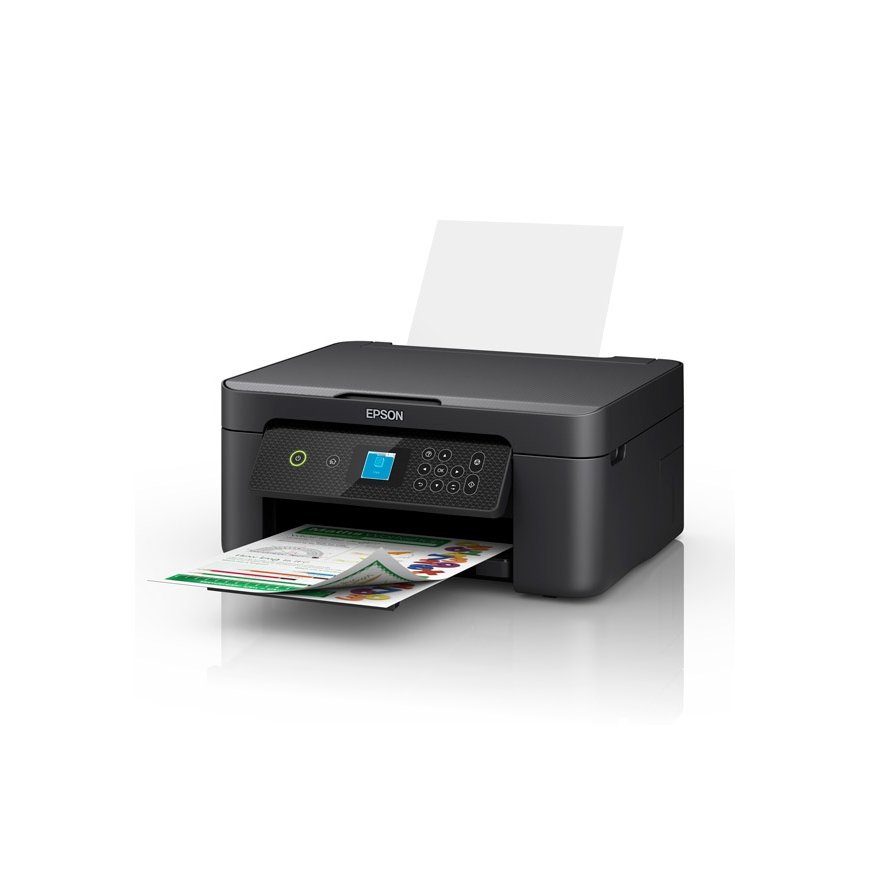
The product's shade and actual color may differ from what is shown in the picture, as the images are for illustrative purposes. The product description is general and may not include all the product's features.
Epson Expression Home XP-3200 Inkjet A4 5760 x 1440 DPI Wi-Fi
119,00 €
Monthly payment from 3.96 €
1432770 C11CK66403
8715946702742
Shipping 4-6 b.d.
You are interested in this product?
This stylish and affordable 3-in-1 delivers much more than just the basics from its compact footprint. Its prints are clear, vibrant and cost effective thanks to individual inks and double-sided printing. Printing away from a desktop is made easy with a range of compatible mobile printing apps and 1.44" LCD screen.
AFFORDABLE INDIVIDUAL INK CARTRIDGES
Depending on what you are printing – lots of blue skies will mean your cyan will need replacing sooner than other colours – your printer's ink will reduce at different levels. With individual inks you only need to replace one cartridge at a time – the one that actually needs replacing. With tri-colour cartridges, you end up throwing away the entire cartridge even if just one colour runs out, meaning you waste the good ink you have left. Wasted ink is just wasted money. Epson individual ink cartridges means you save money and don't waste ink.
EPSON SMART-PANEL
An innovative interface, the Epson Smart Panel app² transforms your iOS® or Android™ mobile device³ into an intuitive control centre for your Epson Expression Home XP-3200. This powerful tool makes it easy to set up, monitor, print, scan and more using your Epson printer, right from your hand-held device. With quick-configuration features, it offers easy product setup on your wireless network and automatically detects your printer. Customise the app to your own preferences and requirements. Built to offer everything you need in one convenient app, Epson Smart Panel allows you to register your product, order supplies and easily access troubleshooting tips.
POWERED BY HEAT-FREE TECHNOLOGY
The Epson Expression Home XP-3200 is powered by Epson Micro Piezo with Heat-Free Technology. Micro Piezo technology utilises piezo crystals that pulse when electrical signals are sent to them by the printer. It produces incredibly consistent droplets, both in shape and size, to deliver clear and sharp prints.
Simple wired & wireless connectivity
The Epson Expression Home XP-3200 supports the latest wireless standard, 802.11 b/g/n4 and includes Wi-Fi Direct®. Which means no router is required, providing users with greater coverage and faster speeds. You can use your printer from anywhere in your home and share it with multiple PCs.
Print from your iPad or iPhone
Apple® AirPrint™ makes it simple to print emails, web pages, presentations and documents straight from their iPad or iPhone. There's no software to download, no drivers to install and no cables to connect. Your Apple® IOS® device will automatically connect to the printer.
Printing | |
| Print technology | Inkjet |
| Number of print cartridges | 4 |
| Maximum resolution | 5760 x 1440 DPI |
| Printing colours | Black, Yellow, Cyan, Magenta |
| Borderless printing | Yes |
Copying | |
| Copying | Colour copying |
Scanning | |
| Optical scanning resolution | 1200 x 2400 DPI |
| Scanner type | Flatbed scanner |
| Scan technology | CIS |
| Scanning | Colour scanning |
Paper handling | |
| ISO A-series sizes (A0...A9) | A4, A5, A6 |
| ISO B-series sizes (B0...B9) | B5 |
| Photo paper sizes (imperial) | 3.5x5, 4x6, 5x7, 5x8, 8x10 |
| Paper tray media types | Photo paper, Plain paper, Envelopes |
Ports & interfaces | |
| Direct printing | Yes |
| Wi-Fi | Yes |
| Ethernet LAN | No |
| USB port | Yes |
| USB 2.0 ports quantity | 1 |
| Mobile printing technologies | Apple AirPrint |
Performance | |
| Display | LCD |
| Product colour | Black |
| Built-in display | Yes |
| Display diagonal | 3.66 cm (1.44") |
Power | |
| AC input voltage | 100 - 240 V |
| AC input frequency | 50 - 60 Hz |
Weight & dimensions | |
| Weight | 4.3 kg |
| Width | 375 mm |
| Depth | 300 mm |
| Height | 170 mm |
Input & output capacity | |
| Total output capacity | 100 sheets |
| Total input capacity | 100 sheets |
| Total number of input trays | 1 |
System requirements | |
| Windows operating systems supported | Windows 7, Windows 8, Windows 10, Windows 8.1, Windows 11 |
| Mac operating systems supported | Mac OS X 10.7 Lion, Mac OS X 10.8 Mountain Lion, Mac OS X 10.9 Mavericks, Mac OS X 11.0 Big Sur, Mac OS X 12.0 Monterey |